June 12, 2009

How To: Disable General Protection Fault Dialog for Your Program

Abstraction
Are you using any 3rd-party componet or ActiveX, which is not stable enough, in your program? You will get a GPF dialog if the componet in your program goes abnormal. That is not your problem totally, but actually your program crashed. There's a Windows API to prevent showing GPF dialog, you may adapt this solution if the crash can be ignored.

Code Snippet

UINT uPrevErrMode = SetErrorMode(SEM_NOGPFAULTERRORBOX);

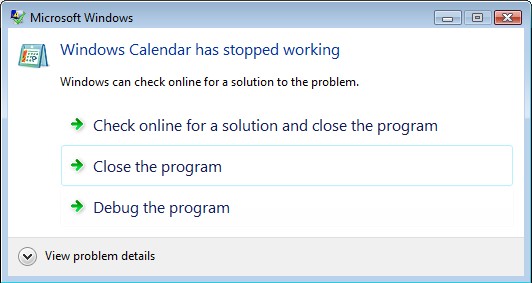
Do you not know what GPF is?

Windows Calendar Crash

Reference on MSDN

June 06, 2009

Read/Write Windows Registry on Windows 64-Bits Platforms (C# Version)

Abstraction
How does a 32-bits(x64) program running on Windows 64-bits(x64) access the 64-bits registry? In C#, you can use P/Invoke to call RegOpenKeyEx function with KEY_WOW64_KEY to access the 64-bits registry.

Code Snippet

//
// This is a C# example to get the version of Windows Media Center on Windows 7 64-bits.
//

class RegQueryValueDemo
{
  [DllImport("advapi32.dll", CharSet = CharSet.Unicode, EntryPoint = "RegOpenKeyExW", SetLastError = true)]
  public static extern int RegOpenKeyEx(UIntPtr hKey, string subKey, uint options, int sam, out UIntPtr phkResult);
  public static UIntPtr HKEY_CURRENT_USER = (UIntPtr)0x80000001;
  public static UIntPtr HKEY_LOCAL_MACHINE = (UIntPtr)0x80000002;
  public static int KEY_QUERY_VALUE = 0x0001;
  public static int KEY_SET_VALUE = 0x0002;
  public static int KEY_CREATE_SUB_KEY = 0x0004;
  public static int KEY_ENUMERATE_SUB_KEYS = 0x0008;
  public static int KEY_WOW64_64KEY = 0x0100;
  public static int KEY_WOW64_32KEY = 0x0200;

  [DllImport("advapi32.dll", CharSet = CharSet.Unicode, EntryPoint = "RegQueryValueExW", SetLastError = true)]
  public static extern int RegQueryValueEx(UIntPtr hKey, string lpValueName, int lpReserved, out uint lpType,
    StringBuilder lpData, ref int lpcbData);

  public string GetMCEIdent()
  {
    UIntPtr regKeyHandle;
    if (RegOpenKeyEx(
    HKEY_LOCAL_MACHINE,
    "SOFTWARE\\Microsoft\\Windows\\CurrentVersion\\Media Center",
    0, KEY_QUERY_VALUE | KEY_WOW64_64KEY, out regKeyHandle) == 0)
    {
      uint type;

      StringBuilder stringBuilder = new StringBuilder(2048);
      int cbData = stringBuilder.Capacity;
      if (RegQueryValueEx(regKeyHandle, "Ident", 0, out type, stringBuilder, ref cbData) == 0)
      {
        return stringBuilder.ToString();
      }
    }

    return string.Empty;
  }
}


Find a C++ version?
Read/Write Windows Registry on Windows 64-Bits Platforms

Reference on MSDN:
RegOpenKeyEx Function
32-bit and 64-bit Application Data in the Registry

May 24, 2009

How To: A Web Page Interacts with a Embedded Web Browser Control

If your application contains a web browser control to show certain web page, can the web page interact with your application by script language? Yes, it can.

There's a sample on MSDN, it's very short but clear, please refer to the following link:

Reference on MSDN

May 20, 2009

Windows Media ASF Viewer

Windows Media® ASF Viewer 9 Series is a tool for inspecting the contents of files (such as .asf. .wma, and .wmv file) to make sure they meet the requirements of the Advanced Systems Format (ASF) specification. -- Microsoft


Brief Introduction
This tool is very helpful for analyzing the contents of ASF files, it helps us to know the media structure and content easily. I was trying to encode WMV using Windows Media Format SDK, and this tool really helped me to verify the output content.

Download from Microsoft

May 14, 2009

How To: Extracting the embedded album art from a MP3 / WMA

I'm using Windows Media Sync Reader in Windows Media Format SDK to get the album art from id3 tag of a MP3, it can also get from a WMA.

Code Snippet:

#include <windows.h>
#include <wmsdk.h>
#include <atlbase.h>

#pragma comment(lib, "wmvcore.lib")

bool ExtractEmbeddedAlbumArt(LPCWSTR wszAudioFile)
{
  bool bOK = false;

  WM_PICTURE* pPicture = NULL;;

  do {

    CComPtr<IWMSyncReader> pIWMSyncReader;
    if(FAILED(WMCreateSyncReader(NULL, 0, &pIWMSyncReader))) break;

    if(FAILED(pIWMSyncReader->Open(wszAudioFile))) break;

    CComPtr<IWMHeaderInfo3> pIWMHeaderInfo3;
    if(FAILED(pIWMSyncReader->QueryInterface(&pIWMHeaderInfo3))) break;

    WMT_ATTR_DATATYPE wmtDataType = WMT_TYPE_BINARY;
    WORD wStreamNum = 0;
    WORD wLength = 0;
    if(FAILED(pIWMHeaderInfo3->GetAttributeByName(
      &wStreamNum, g_wszWMPicture, &wmtDataType, NULL, &wLength))) break;

    pPicture = (WM_PICTURE*)new BYTE[wLength];

    if(FAILED(pIWMHeaderInfo3->GetAttributeByName(
      &wStreamNum, g_wszWMPicture, &wmtDataType, (BYTE*)pPicture, &wLength))) break;

    bOK = true;

  } while(false);

  if(pPicture)
  {
    //
    // TODO: Save the picture or do something with it
    //

    delete [] (BYTE*)pPicture;
    pPicture = NULL;
  }

  return bOK;
}

April 28, 2009

How To: Handle dynamic format change in ReceiveConnection function on a renderer filter.

I was trying to correctly handle dynamic format change on my video null renderer and had fought against it for several days.

The following code snippet is my final work for handling dynamic format change, it seems to work fine, I hope so :p


STDMETHODIMP CNullRendererInputPin::ReceiveConnection(IPin * pConnector, const AM_MEDIA_TYPE *pmt)
{
  CAutoLock lock(m_pLock);

  CMediaType newMediaType(*pmt);

  HRESULT hr = E_FAIL;

  if(m_Connected && m_Connected == pConnector && newMediaType != m_mt)
  {
    do {

      hr = CheckMediaType(&newMediaType);
      if(FAILED(hr)) break;

      BITMAPINFO bmpinfo = {0};
      if(FORMAT_VideoInfo == pmt->formattype && 1 == pmt->bFixedSizeSamples)
      {
        VIDEOINFOHEADER* t = (VIDEOINFOHEADER*)(pmt->pbFormat);
        bmpinfo.bmiHeader = t->bmiHeader;
      }
      else if(FORMAT_VideoInfo2 == pmt->formattype && 1 == pmt->bFixedSizeSamples)
      {
        VIDEOINFOHEADER2* t = (VIDEOINFOHEADER2*)(pmt->pbFormat);
        bmpinfo.bmiHeader = t->bmiHeader;
      }
      else
      {
        hr = E_UNEXPECTED;
        break;
      }

      ALLOCATOR_PROPERTIES allocProperties = {0};
      {
        hr = m_pAllocator->GetProperties(&allocProperties);
        if(FAILED(hr)) break;

        allocProperties.cbBuffer = bmpinfo.bmiHeader.biSizeImage;
      }

      hr = SetMediaType(&newMediaType);
      if(FAILED(hr)) break;

      hr = m_pAllocator->Decommit();
      if(FAILED(hr)) break;

      {
        ALLOCATOR_PROPERTIES newAllocProperties = {0};
        hr = m_pAllocator->SetProperties(&allocProperties, &newAllocProperties);
        if(FAILED(hr)) break;
      }

      hr = m_pAllocator->Commit();
      if(FAILED(hr)) break;

      hr = S_OK;

    } while(false);
  }
  else
  {
    hr = CBasePin::ReceiveConnection(pConnector, pmt);
  }

  return hr;
}

April 15, 2009

Why will WCF client be disconnected after the connection idles for a long time?

The default receive timeout is 10 minutes, so WCF client will be disconnected after the idle time exceeded that limitation. What can I do if the connection needs to be kept alive?

Solution #1 - Server provides a dummy operation for client calls it regularly to let it not idle.

Solution #2 - Enable reliableSession and set receiveTimeout and inactivityTimeout to "infinite" in both the client and server.

The configuration snippet may like the following:

<system.serviceModel>
  <bindings>
    <wsHttpBinding>
      <binding name="WSHttpBinding" receiveTimeout="infinite">
        <reliableSession inactivityTimeout="infinite" enabled="true" />
      </binding>
    </wsHttpBinding>
  </bindings>
  <services>
  ...
  </services>
  ...
</system.serviceModel>

You can get more detail explanation in the following reference link.

Reference in MSDN:
Binding.ReceiveTimeout Property

Reference in Paulo Reichert's Blog
WCF Reliable Sessions Puzzle